Under The Microscope

MacOS 26 (Tahoe) Includes Important Audio-Related Bug Fixes

When you upgrade to Tahoe, you’ll benefit from multiple bug fixes. Be sure you move up 26.1 for the best experience.

Back in September, we noted two critical bugs in MacOS 26 (Tahoe), Apple’s latest update to the Mac’s operating system. As a result of these issues, we suggested holding off on upgrading to the initial 26.0 release.

We’ve since been tracking Apple’s progress fixing those bugs in subsequent MacOS beta releases. We’re happy to report that the issues we reported have been resolved with the recent release of MacOS 26.1, and that Tahoe contains several additional fixes for various audio bugs. With that in mind, we’re now able to recommend upgrading your Mac to Tahoe (26.1 or higher).

Below, you’ll find an overview of important audio-related bug fixes found in Tahoe. Each of these bugs previously impacted all five of our audio capture tools:

Airfoil Audio Hijack Loopback Piezo SoundSource

  • Audio From FaceTime and Phone Is No Longer Lost
    A critical bug introduced in MacOS 26.0 led to audio captures from FaceTime and the new Phone app failing in many setups. These issues have been addressed in 26.1. Capturing audio from FaceTime or Phone should now work without any issue.

  • Sample Rate Mismatches No Longer Cause Failed Audio Captures
    A second critical bug introduced in MacOS 26.0 led to audio captures failing when secondary output devices had a different sample rate than that of the system’s default output device. This problem has also been corrected in 26.1.

  • Improved Audio Capture From Safari at 44.1 kHz
    When the default output for the Mac was set to a sample rate of 44.1 kHz, audio played by Safari could have skipping or clicks when it was captured. This issue has been corrected, and all audio capture from Safari should sound flawless.

  • Reliable “Hey Siri” Access
    Previously, the system could fail to recognize spoken requests for Siri when you were capturing audio with our products. On Tahoe, using “Hey Siri” should now always work as expected.

  • Capture of Audio at Low Sample Rates Once Again Works as Expected
    A regression in later versions of MacOS 15 (Sequoia) led to audio capture failures when audio was played at low sample rates. On Tahoe, capturing works as expected regardless of sample rate.

  • More Reliable Capture With Some Advanced Audio Devices
    A bug in older versions of MacOS resulted in audio capture issues with devices from manufacturers like MOTU and Apogee which use stream groups. Updates in Tahoe have addressed issues where the wrong audio could be captured, as well as problems of silenced audio incorrectly being heard.

  • Low-Pass Filter, Lowered
    Prior to Tahoe, a strong low-pass filter was applied by the system to all audio captures. Updates from Apple mean this filter is no longer applied as aggressively.

One additional bug affected only Audio Hijack:

  • Fully Functional Apple Music Track Title Capture
    In the 26.0 release of Tahoe, retrieval of track titles from Apple Music was broken for streaming songs. With MacOS 26.1, track titles can once again be retrieved from streaming songs, as well as local songs.

Consider Upgrading to Tahoe Now

We advise a conservative approach when it comes to upgrading your Mac’s operating system, but with Apple’s 26.1 update, we’re confident in recommending Tahoe for our users. The fixes detailed above make Tahoe the best OS for most users.

Of course, the latest versions of our own products are always our recommended versions. To make sure you have our latest, just select Check for Updates from within the app.

Rogue Amoeba’s Apps Are Ready for MacOS 26 (Tahoe)

Tahoe may not be quite ready for you though.

With our recent update to Fission, all Rogue Amoeba applications now support MacOS 26 (Tahoe). If you’ve updated your Mac to Tahoe, just download our latest versions to get going.

Consider Delaying Your Upgrade

However, while our products are ready for Tahoe, Tahoe itself comes with a few caveats. It’s always wise to be cautious in upgrading your Mac’s operating system, but this year, there are particular reasons to take things slow.

Unfortunately, Tahoe contains two significant bugs which can lead to lost audio. We’ve created a support article which provides full details on the problems, as well as information on working around them. Click below to read:

The necessary fixes for both of these bugs must be made in a future update to Tahoe itself. We’re in contact with Apple about these issues, and we’re hopeful fixes will arrive in the near future. We also expect that most users have setups which will not run into these issues.

Still, if you’re able to delay upgrading your Mac to Tahoe, we currently recommend doing so. Sticking with MacOS 15 (Sequoia) is a sure-fire way to avoid problems at this time.

More to Come

As soon as new betas of Tahoe arrive, we’ll be testing them to determine when these OS bugs have been fixed. We’ll keep you apprised via this blog, as well as our always helpful Status page.

Of course, while we await further MacOS updates, we’ll also be busy improving our own apps. We’re hard at work on some big new features which we’ll be releasing in the months ahead.

For now, though, we’re pleased to have completed the work to support Tahoe across our product line. As always, to ensure you have our latest versions, download right from our site or select Check for Updates from within the app.

Fission 2.9 Gets a Fresh Face

The latest free update to our audio editor sports a refreshed interface, as well as support for MacOS 26 (Tahoe).

Today, we’re releasing a free update to our audio editor Fission. You’ll find a lovely interface refresh in the new version 2.9, as well as a handful of small bug fixes and support for Apple’s forthcoming MacOS 26 (Tahoe). Read on for more details, or update immediately by selecting “Check for Update” in the Fission menu.

Look at What’s New

The first change you’ll notice with the new Fission is its new app icon. That icon has been updated in accordance with changes Apple has dictated in MacOS 26 (Tahoe).

Once you open Fission, you’ll spot many more changes. In fact, the entire application has been given a virtual fresh coat of paint. You’ll spot updates to the Start window, the editing window, and the Batch Converter.

We polished many parts of the app for this update, while still making sure Fission’s powerful functionality stays at your fingertips. Most notably, the light theme has been refreshed to lean into the app’s gold coloring. As well, art assets throughout the app have been improved, to make Fission look better than ever.

Fission also works better than ever. There are a handful of minor bug fixes in this free update, plus some improvements to accessibility for our VoiceOver users. Of course, as always, we’ve got comprehensive release notes you can check out.

Initial MacOS 26 (Tahoe) Support

Apple has announced that the new MacOS 26 (Tahoe) will be shipping on September 15, 2025. With this update, Fission now offers initial support for Tahoe. As you can see on our helpful Status page, there are no known issues when using Fission on the new OS. Whether you’re already running Tahoe, or you’re planning to update soon, Fission is ready.

Get Fission 2.9 Now

If you’re already a Fission user, get the latest by selecting Check for Updates from the Fission menu.

If you’re not yet using our fast and easy-to-use audio editor, visit the product page to learn more and download the free trial today. You’ll be glad you did.

When a Bug Saved the Company

Fortune favors the buggy?

In the realm of computers, bugs are generally a bad thing. Every year, our team ships dozens of free updates to eliminate bugs that are an inescapable byproduct of the countless variables in software development. Rarely, though, a bug can be beneficial. Back in 2002, a software bug saved Rogue Amoeba.

It started when we shipped the very first version of Audio Hijack. We wanted to give potential customers the ability to fully test the app prior to purchase, but we weren’t sure how best to limit that free trial. Our initial download provided 15 full days of completely unlimited usage.

A dialog reading “Thank you for trying out Audio Hijack. Use it to enhance the audio from any application! Try it out for up to 15 days, and if you like it, purchase it for just $ 16. Audio Hijack - Extra Sugar for Your Ear Candy”
From pinstripes to a goofy tagline, there’s a lot going on in this dialog.1

The app’s functionality only became constrained after that 15 day trial period had elapsed. Our documentation at the time explained what would happen:

After 15 days, Audio Hijack will nag you to register at launch and will quit after 15 minutes. Additionally, the recording feature will be disabled.

We hope that before your 15 days are up, you’ll want to register Audio Hijack, so you won’t have to worry about this.

Unfortunately for our business, what we hoped for seldom came to pass. Sales were middling. Though we knew we had a useful tool, it seemed unlikely Rogue Amoeba could ever be more than a side project.

Still, we continued developing the software and shipping new versions, eventually releasing Audio Hijack 1.6. It was a relatively minor update, without any eye-catching new features. Given that, we were shocked when we saw sales jump to a new (and viable!) level. Then, they stayed there.

As days of sustainable sales turned into weeks, we were thrilled but confused. Initially, we couldn’t figure out what had happened. Eventually, though, we tracked down the change. It was a bug! In version 1.6, we accidentally broke the intended 15 days of unrestricted usage. Instead, from day one, the app was limited to 15 minutes of recording. After that, all trial users were confronted with this dialog:

A dialog reading “You've reached the recording time limit. This feature is limited during the evaluation period. Once you register, the recording length will be unlimited.”
Alerts in our apps now have much better titles.

Compared to giving away two-plus weeks for free, this stricter limitation led to dramatically higher sales. We had unwittingly created a vastly superior trial. It’s stuck around, too. Though we’ve refined things further, our current trial limitations directly descend from this rogue idea we stumbled into.

With this change, our low sales rose to a level where it was worth continuing to work on and improve Audio Hijack. Within a year, Rogue Amoeba became a full-time job for the three founders, and our company now employs a dozen people. If not for this fortunate mistake, it’s very likely we’d eventually have given up long ago. It’s no exaggeration to say that this bug saved both Audio Hijack and our company.


Footnotes:

  1. That tagline existed because the fair-use right to time shifting was not yet well-established. Given that, we focused our early marketing on the audio adjustments the app made possible. While Audio Hijack can still help with that, nowadays, we recommend SoundSource as the best solution for applying effects to any audio on your Mac. ↩︎

CBXV

Chris Barajas is the inaugural member of Rogue Amoeba’s 15 (!) year club. Wow!

As you may already know, I relish the chance to celebrate employee milestones. Making outstanding audio tools requires an outstanding team, and we’re honored to work with such stellar staff. We’re particularly proud that so many of our employees have long tenures with us. Today, I’m delighted to induct the first member into Rogue Amoeba’s 15 (!) year club: Chris Barajas.

Looking Back at Fifteen Great Years

Way back in 2010, Chris joined us to handle all of our front-line support. In that role, he answered countless emails and assisted tens of thousands of users in getting the most out of our products. That work alone is worthy of much acclaim, but it’s only part of how Chris has contributed to Rogue Amoeba’s successes.

In 2017, our lone Support position grew into a two-person team. Chris and Robert Charlton worked side-by-side, but Chris’s years of experience enabled him to take the lead on many things. For several years, Chris and Robert acted as a fantastic tag team. In 2020, however, the COVID-19 pandemic in 2020 lead to a huge uptick in usage.

At that point, our Support team grew to three. Soon after, Chris was promoted to the new position of Support Manager. He’s been officially leading the Support team ever since, continuing to answer customer emails while also guiding our renowned Support operation. Chris now works on a wide variety of related tasks, from streamlining tools to help customers to refining our marketing. His direct contact with customers continues as well, making him an invaluable part of our product development cycle.

For fifteen years and counting, Chris has helped shape Rogue Amoeba. We couldn’t be more pleased to celebrate him today.

The Watch Anniversary

In honor of this anniversary, we recently presented Chris with some gifts. Everyone appreciates a nice monetary bonus, and the custom cards our designer Neale creates are always tremendous as well:

A lovely custom card for Chris

To commemorate his decade and a half with the company, we also wanted to provide Chris with a special object. Knowing that 15 years is the watch anniversary, we decided an Apple watch would do nicely. Do note the capitalization there, though, because we’re not talking about a smartwatch. Instead, we tracked down the original Apple watch:

The original Apple watch

Here’s a closer look:

The original Apple watch, close up

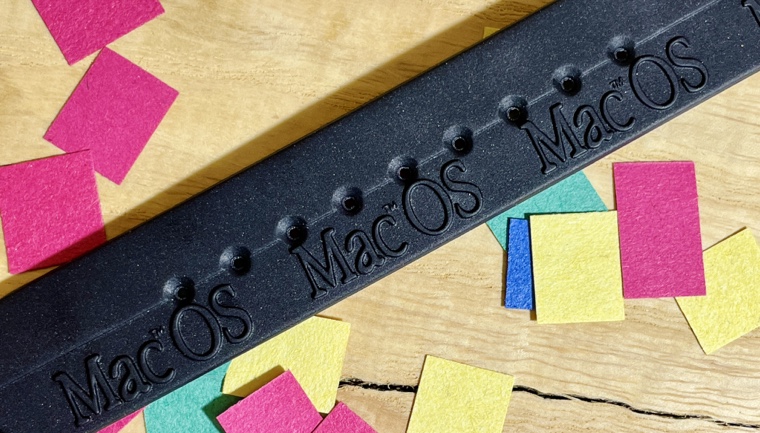
This strange beauty was a promotional giveaway way back in 1995. And speaking of capitalization, this watch’s original band even correctly uses an uppercase “M” in “MacOS” (or maybe that’s “Mac OS”? Still good!):

The Apple watch’s band, with the text “MacOS” on it, including a capital letter “M”.

That text is actually rather incongruous, because the Mac’s operating system was still called “System 7.5” in 1995. That didn’t change until 1997, with the arrival of Mac OS 7.6.

Odd branding aside, this watch is both a functional timepiece and a charming reminder of years gone by. Chris’s career has been tied to Apple and the Mac, and this memento is a tribute to his fine work over many years. We hope it brings a smile to Chris’s face, whether he’s wearing it or just glancing at it on a shelf.

Three Cheers for Chris

Chris’s tenure spans almost two-thirds of Rogue Amoeba’s existence, and his impact in that time has been immeasurable. In countless ways, Rogue Amoeba is better because of Chris. So on behalf of the entire Rogue Amoeba team, I want to express our tremendous appreciation. It’s been a privilege to work with Chris since 2010, and we hope for many great years to come!